Business Model Diagram Sheet
Business Model Diagram Sheet
Couldn't load pickup availability
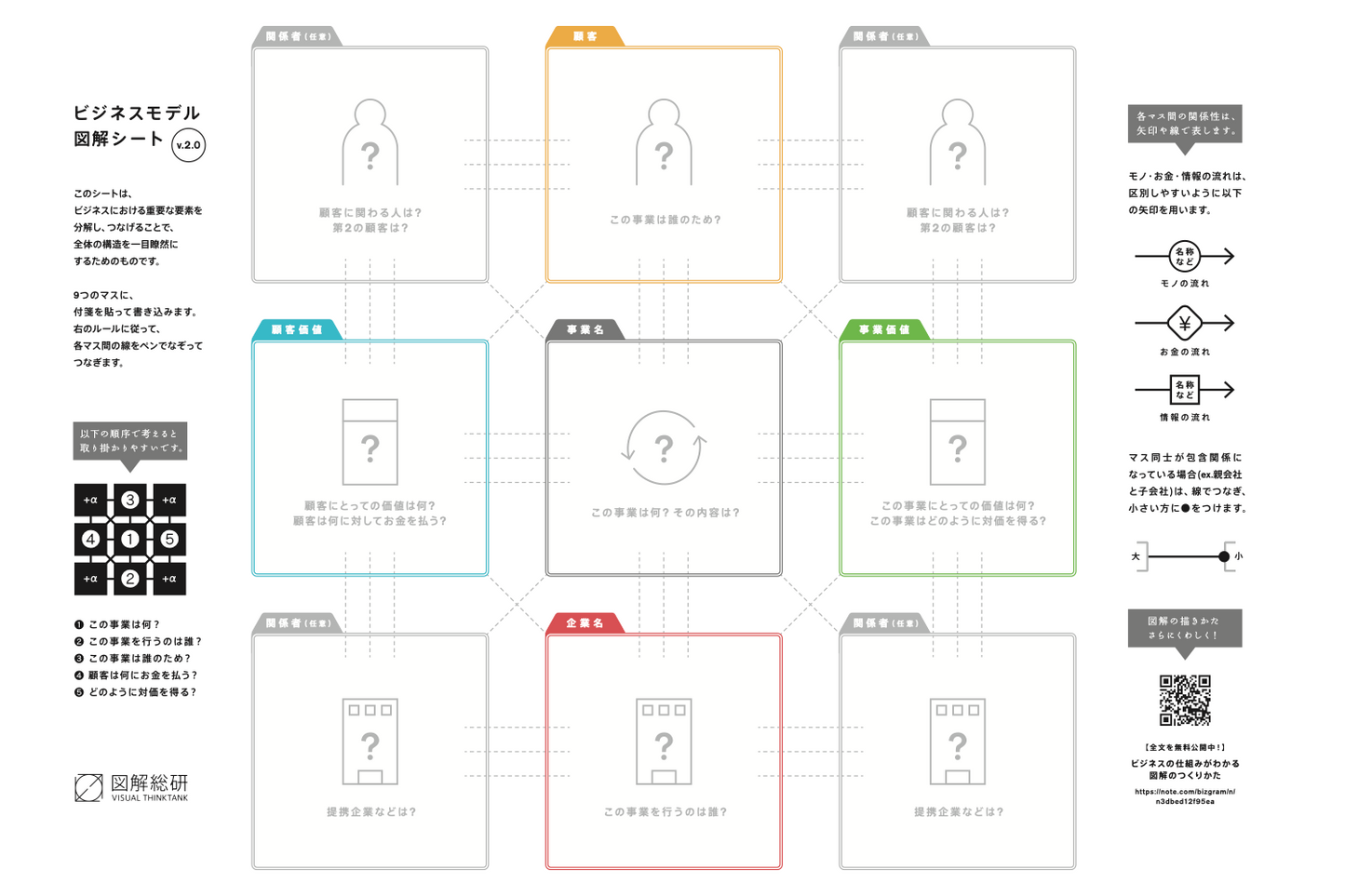
This is a sheet that allows you to illustrate your business model by your hands. It is a tool to be printed on A3 paper and use with sticky notes and a pen.
Product Overview
The "Business Model Diagram Sheet" is a sheet optimized for A3 printing that allows you to create a business model diagram using sticky notes and a pen. The Zukai Institute, Inc. has held dozens of business model diagram workshops for companies, and this was created to allow people to actually create business model diagrams by hand.
It has been downloaded over 2,000 times so far* and is used in many business settings, from startups to large corporations. When you purchase, you can download a PDF. You can print it out and use it. It is a tool that allows you to consider business models while sticking regular-sized sticky notes (75mm x 75mm).
*Since it was initially distributed for free, figures from that period are included.
Notes: This product is written in Japanese.
Product Features
Recommended for:
- Those who see the sheet for the first time, since the purpose of the sheet is easy to understand.<br>The purpose of this sheet is written down to make it easy to understand.
- The wording has been adjusted so that even people who are not familiar with business model diagrams can easily create one.<br>The order in which to create a business model diagram has been clearly organized so that even people who do not have a deep understanding of the rules regarding business model diagram can easily create one. In addition, the wording has been added to supplement what you should be aware of in each order. Also, an explanation of the purpose of this sheet and how to use it has been included.
- Easy to use with sticky notes <br>It is suitable with the standard sticky note size (75 x 75mm) and can be re-pasted and reused as many times as you like.
In addition, to ensure that you can still understand the meaning of each square even when you stick a sticky note in it, there is a box in the upper left corner of the square with the meaning of that square written on it.
This way, even if you fill up the squares with sticky notes, you won't lose track of what you should put there. - In addition to the information on the sheet, there are links to information for people who want to know how to create business model diagrams . A QR code and URL are attached to the sheet so that you can jump to the full article of the book "How to Create Diagrams -Understand Business Structures-" written by Zukai Institute. You can use it as a reference when you want to know more about business model diagrams or get lost in the middle of creating one. It is packed with Zukai Institute's know-how on business model diagrams, so we are sure you will find some useful hints.
Recommended for:
- Those who want to think about business models using hands
- Those who know about business model diagrams, but I don't know you can print them out on paper, and want to try.
- Those who want to use it when discussing business models with those colleagues at work.
Important points to note when purchasing
- The expressions and reproducibility shown in this product vary from person to person, and do not necessarily guarantee profit or effectiveness.
- As a principle, we cannot accept order cancellations due to customer's convenience after payment is completed. Also, we will not refund the payment made. Please be kindly noted in advance. In addition, due to the nature of digital content products, returns are not accepted at all. Due to its nature, this will be treated as a defect issue rather than a return. In case of a defect, such as the content file being damaged and thus impossible to download or view, we will cancel the charge after our investigation. Problems due to the customer's unique environment are not eligible for return.
- A receipt will be issued automatically. If necessary, click “領収書を印刷する” (Print Receipt) on the screen displayed after purchase or in the email sent after purchase to issue one.